

Starlink for Travel: Setup, Speeds, Coverage and Cost Guide (2026)
Let’s be brutally honest. Trying to get work done on a patchy campground Wi-Fi network is a miserable experience. You know the drill. You park your rig, connect to the local network, and watch a simple email take five minutes to send.
Cellular hotspots aren’t much better once you venture off the interstate. Dead zones are everywhere. But satellite internet has completely flipped the script for digital nomads, full-time RVers, and weekend road-trippers. Starlink now dominates the mobile internet space.
SpaceX didn’t just sit still this year. Big pricing shifts, hardware discounts, and plan changes rolled out in early 2026. If you plan to live, work, or travel out of a backpack or van, here is everything you need to know about taking Starlink on the road.
Quick read
- Hardware got cheaper: The ultra-portable Starlink Mini dropped to $249, with new customers scoring it for just $199.
- More data for less: The $50/month base travel plan doubled from 50GB to 100GB.
- No more pay-per-GB: Overage data purchases are gone. Hit your 100GB cap, and speeds throttle to 1 Mbps, or you upgrade to Unlimited.
- Unlimited Roam costs $165/mo: Perfect for full-time travelers needing massive bandwidth.
- In-motion rules tightened: You must have a Roam plan to use Starlink while driving. Standard standby plans block in-motion use.
Which Dish Fits Your Trip?
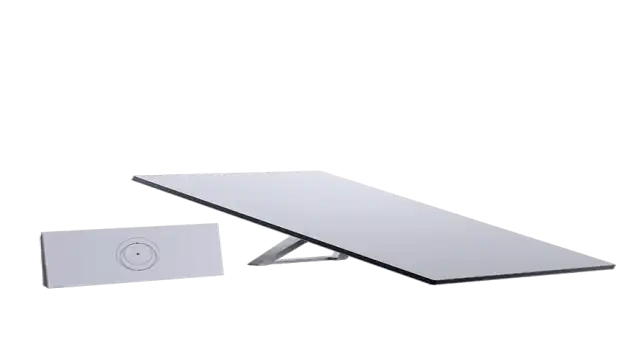
Picking the right equipment is your first hurdle. You basically have two choices for travel: the brand-new Starlink Mini or the Standard V4 kit. Let’s break them down so you don’t waste cash on gear you don’t need.
Starlink Mini
This little device changed the game. It weighs just 2.5 pounds and fits easily into a standard backpack. At roughly 11.75 by 10.2 inches, it feels like carrying a thick laptop.
Why is the Mini flying off the shelves? Price. Originally launching at $599, the Mini now retails for $249. Better yet, if you are a brand-new customer activating a line, Starlink offers a promotional “activation benefit” that drops the dish to an insane $199.
The router is built right into the dish. You don’t need a separate router sitting inside your van taking up counter space. Just point it at the sky, plug it in, and you are online. It draws only 20 to 40 watts of power. You can genuinely run this thing for hours off a decent 100W USB-C power bank.
Standard V4 Kit
Need something with a bit more muscle? The Standard Kit runs $349. It requires a traditional wall outlet or a hefty inverter setup in your RV.

This dish comes with a separate Gen 3 router. It draws more power but handles adverse weather and heavy multi-device usage much better than the Mini. If you have four people streaming different 4K movies while parked at a dusty campsite, buy the Standard kit. Solo travelers and budget-conscious road-trippers should stick to the Mini.
Breaking Down Starlink Roam Plans and Costs
SpaceX overhauled their subscription tiers in January 2026. They tossed out confusing add-ons and streamlined the mobile options. Here is exactly what you will pay to stay connected.
Roam 100GB ($50/Month)
This is the undeniable sweet spot for weekend warriors. For fifty bucks, you get 100GB of high-speed data. Prior to this year, that price only bought you 50GB.
What happens when you stream too much Netflix and hit that 100GB ceiling? Your internet doesn’t shut off. Instead, Starlink drops your speed to a maximum of 1 Mbps. That is slow. You can still send emails and use basic navigation, but Zoom calls will freeze, and streaming is dead in the water.
SpaceX entirely removed the option to buy extra high-speed data by the gigabyte. If you hit the cap and need speed immediately, you are forced to upgrade to the Unlimited tier.
Roam Unlimited ($165/Month)
Are you working full-time from the road? Skip the base tier. Roam Unlimited costs $165 per month and completely removes the data cap.
You can download massive video files, game online, and stream relentlessly. This plan covers the entire United States, including Alaska and Hawaii. It also allows in-motion use up to 100 mph (160 km/h). Just remember that “Unlimited” means limitless data, not maximum priority. Travel plans are always deprioritized behind stationary residential users.
Going International?
Van life doesn’t always stop at the border. If you plan to drive down to Baja or up into the Canadian Rockies, you need a broader plan.
- Regional Roam ($150/month): Covers unlimited data anywhere within your home continent.
- Global Roam ($200/month): Gives you coverage across all continents where Starlink operates.
A quick warning: Starlink caps international use to two continuous months per trip. If you plan to spend six months parked on a beach in Mexico with a US-registered dish, you will face service interruptions unless you update your account region.

Real-world Speeds & Coverage
Marketing brochures love to throw around massive numbers. Let’s talk reality.
How fast is Starlink when you are actually parked in a crowded national park? On a Roam plan, expect download speeds bouncing between 50 Mbps and 150 Mbps. Upload speeds usually hover around 10 to 20 Mbps.
This is more than enough for remote work. I routinely rely on those speeds for high-definition video conferencing. The latency usually stays around 25 to 50 milliseconds. You won’t notice any lag unless you play high-speed competitive video games.
Coverage is practically universal across North America. If you can see a clear patch of sky, you have an internet connection. Trees, however, are your absolute worst enemy. Even a few branches swaying between your dish and the satellites will cause micro-drops in your connection. When booking campsites, always ask for an open, unshaded spot.
Power and Placement
You just bought your dish. How do you actually run it in the wild?
Setup takes less than ten minutes. The Starlink app features an augmented reality tool that scans the sky and shows you exactly where potential obstructions are.
Powering Your Rig
Power consumption is the secret killer of off-grid internet. The Standard dish needs AC power. You must run your RV generator or use an inverter attached to a massive lithium battery bank.
The Mini is vastly superior for power conservation. Because it can run via USB-C, you can plug it straight into a portable Jackery or Anker power bank. Some creative nomads even run the Mini directly off 12-volt car sockets using cheap adapter cables.

Using Starlink While Driving
Can you stream Spotify and let the kids watch YouTube while cruising down the highway? Yes. Both the Roam 100GB and Roam Unlimited plans support in-motion connectivity.
You just need a secure way to mount the hardware. The Standard dish has motorized parts, so slapping it on your roof while doing 70 mph is a terrible idea. Most travelers lay the flat Mini flat against a roof rack or dashboard. Starlink strictly blocks the $5/month “Standby” accounts and standard residential accounts from accessing data while moving.
Is Starlink Roam actually worth the hype?
So, should you pull the trigger?
If you take two local weekend camping trips a year, absolutely not. Download some movies on your tablet beforehand and enjoy nature.
But if you are a remote worker, a digital nomad, or an RV enthusiast spending weeks away from home, Starlink is worth every single penny. It offers unparalleled peace of mind. You never have to frantically drive into a small town searching for a coffee shop just to send a crucial work file again.
The $50/month Roam 100GB plan is the best value in satellite internet history. Combining that with the $199 Mini dish creates a highly capable, portable office that literally fits in a backpack.
Time to Hit the Road
Stop letting terrible cellular coverage dictate your travel itinerary. The 2026 pricing updates have made satellite internet wildly accessible. You can pause the service whenever you aren’t traveling, meaning you only pay for the months you actually use.
Ready to upgrade your road trip? Head over to the Starlink website to check your local hardware pricing and claim the $199 Mini activation promo before it disappears. Your future self stuck in a beautiful, cell-signal-free canyon will thank you.

